Free Lease Agreement Template for Every State (PDF)
A print-ready residential lease you can download in one click — no account, no email, no watermark — with your state’s deposit cap and return deadline already written into the text. Fill in the blanks, sign, done.
📄 Template or generator?
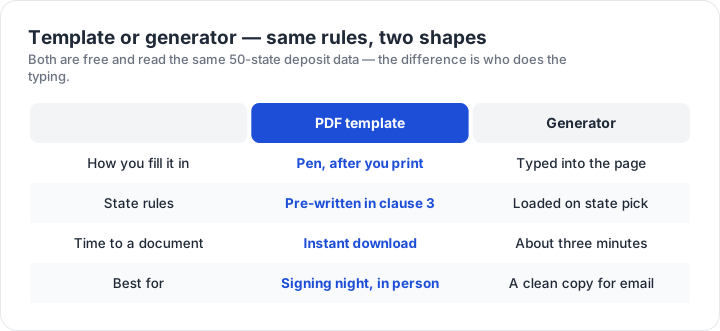
This page is the fast lane: download the PDF and fill it in by hand. Need it typed for you? The lease generator builds the same ten clauses from eight answers, with the same state rules — and prints or saves as PDF.
Download your state’s template
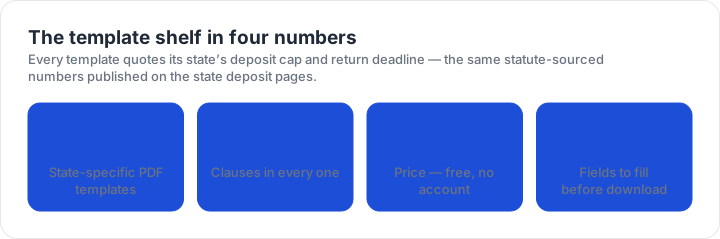
One PDF per state plus Washington, DC — 51 in all. Clause 3 quotes the state’s deposit cap and return deadline; the entry and governing-law clauses are pinned to the state. Click to download, print on plain letter paper:
Click = direct download. Print two copies — one for each party — and do the move-in walkthrough the day keys change hands.
How to use the template
1. Download and print. The PDF is formatted for plain letter paper — two copies, one for each party. 2. Fill in the blanks. Pen is fine; the blanks are sized for handwriting, and anything you leave blank stays open — a lease signed with blanks in it invites exactly the dispute the blank would have answered. 3. Sign both copies. Both parties, both copies, then each side keeps one. Staple the signed move-in inspection report to each copy — clause 9 makes it part of the contract, and it is the evidence that settles deposit disputes.
What’s inside, clause by clause
The template is one page of standard clauses plus your state’s numbers. For each part below: what it is, how to fill it in, and what not to write — the three things that decide whether the clause helps you or hurts you in a dispute.
The parties and the property
What it is: the opening paragraph names everyone signing and the exact rental. How to fill it: use each party’s full legal name — an LLC signs with its registered name, not a manager’s name — and the full street address with city, state, and ZIP. What not to write: nicknames, partial addresses, or an email in place of a legal name; a lease that cannot identify the parties or the property is hard to enforce.
Clause 1 — Term
What it is: how long the lease runs and what happens when it ends. How to fill it: write the length in months and the exact start date; the template already converts the lease to month-to-month after the term unless a renewal or a written notice ends it. What not to write: don’t leave the term blank “to fill in later” — an open-ended start date makes every other date in the lease meaningless.
Clause 2 — Rent
What it is: the amount, the due date, and the late-fee rule. How to fill it: write the monthly number; the template pins the due date to the 1st, so if your deal uses another day, strike “the 1st” and write the day before signing. What not to write: late fees can’t be invented on the spot — the clause only allows fees that state law permits and a signed written addendum states, which is exactly the language courts look for.
Clause 3 — Security deposit
What it is: the money clause — and the one your state has already filled in. The template quotes the state’s deposit cap and the return deadline after move-out, the same statute-sourced numbers published on the state’s deposit page. How to fill it: write a deposit at or under the cap. What not to write: don’t pencil in a deposit above the cap (the clause would contradict itself), don’t cross out the deadline, and don’t call part of it a “non-refundable fee” unless a signed addendum says exactly what it buys.
Clause 4 — Use and occupancy
What it is: the residential-use rule and the guest limit. How to fill it: the 14-day guest line is a workable default — raise it for a long-term housemate, lower it for a short-term rental. What not to write: occupancy limits that single out protected classes (families with children, for example) violate fair-housing law in every state, however the clause is worded.
Clause 5 — Maintenance and repairs
What it is: who fixes what. How to fill it: nothing — the split matches habitability law in every state: tenants keep the unit clean and report problems promptly, landlords maintain the structure and systems. What not to write: never add language where the tenant “accepts the premises as-is” or waives repairs — habitability duties cannot be signed away, and the waiver is the clause a judge reads first.
Clause 6 — Utilities
What it is: who pays for what runs into the unit. How to fill it: the template puts all utilities on the tenant unless an addendum says otherwise — for an all-bills-paid rental, attach the addendum and list exactly which services are covered. What not to write: vague splits like “utilities shared” with no percentages or metering; utility ambiguity is a monthly argument.
Clause 7 — Alterations
What it is: the no-painting, no-demolition rule. How to fill it: leave it strict by default; if you want to allow something specific — wall anchors, a painted accent wall — write the allowance and the restore-to condition into an addendum. What not to write: blanket bans that reach accessibility modifications; fair-housing law protects a tenant’s right to reasonable modifications, and no lease clause overrides it.
Clause 8 — Entry
What it is: how much notice before the landlord comes in. How to fill it: nothing in most states — 24 hours is the template’s baseline and satisfies the states that set a statutory minimum; a handful demand more, and the state’s deposit page lists the figure. What not to write: “landlord may enter at any time” — most states require notice, and a clause like that hands the tenant a violation on a plate.
Clause 9 — Condition and inspection
What it is: the evidence clause. How to fill it: do the move-in walkthrough, photograph everything, both parties sign the report, and staple it to both copies of the lease. What not to write: don’t skip the inspection because the unit “looks fine” — at move-out the deposit fight is decided by whoever has the move-in photos, and this clause is what makes that report part of the contract.
Clause 10 — Governing law
What it is: which state’s law applies. How to fill it: nothing — the template pins it to the property’s state and its city ordinances. What not to write: don’t swap in a different state because the landlord lives there; courts generally apply the law where the property sits, and the wrong state in clause 10 invites the whole lease into dispute.
Pair the template with your state’s rules
Before signing, read the state deposit page for the state named in clause 10 — the cap exceptions (furnished units, pets, owner-occupied buildings) and city-level extras live there, each with its statute citation. The lease signing checklist covers what to verify at the table, and the guides in the lease library — eviction notice periods, rent increases, roommates, renewals, sublets — all apply to the lease you’re holding. If a deposit is withheld at move-out anyway, the demand letter template is the first move.
Want it filled in automatically?
Answer eight questions and the free generator writes your state’s deposit cap and return deadline into a complete lease in about three minutes.